
Your Business Email Got Hacked — Here's What to Do Now
By Type 5 Technology Team · Published February 15, 2026 · Updated April 2026

You just found out that your business email has been compromised. Maybe a client called to ask about a suspicious invoice. Maybe you noticed emails in your Sent folder that you did not write. Maybe you got locked out of your own account. Whatever the trigger, the next few hours matter more than you think.
Business email compromise (BEC) is the most financially damaging form of cybercrime in the United States. According to the FBI's Internet Crime Complaint Center (IC3), BEC attacks caused over $2.9 billion in losses in 2023 alone — more than ransomware, more than identity theft, more than any other category.
This guide walks you through exactly what to do, step by step, if your business email has been compromised.
Step 1: Contain the Breach Immediately
Speed matters. The longer an attacker has access to your email, the more damage they can do. Take these actions within the first 30 minutes:
Change the Password
Change the password on the compromised account immediately. Use a strong, unique password that has never been used anywhere else. If you cannot log in because the attacker changed the password, have your IT administrator or Microsoft 365 admin reset it from the admin console.
Revoke All Active Sessions
Changing the password does not immediately kick the attacker out if they have an active session. In Microsoft 365, go to the admin center and revoke all sessions for the compromised user. In Google Workspace, sign the user out of all sessions. This forces the attacker to re-authenticate — which they cannot do if you have changed the password.
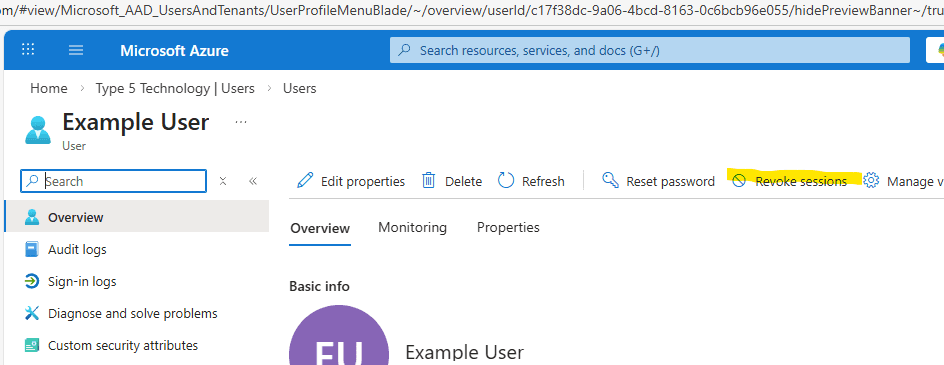
The Revoke Sessions button in Microsoft Entra ID admin center.
Enable Multi-Factor Authentication
If MFA was not already enabled, enable it now. If it was enabled and the attacker bypassed it, review the MFA methods — the attacker may have added their own phone number or authentication app. Remove any MFA methods you do not recognize. According to Microsoft, MFA blocks over 99.9% of account compromise attacks.
Step 2: Investigate the Scope
Once you have locked the attacker out, you need to understand what they did while they had access. Do not skip this step — many BEC attacks involve setting up persistence mechanisms that let the attacker regain access later.
Check Email Forwarding Rules
This is the most common persistence tactic. Attackers create inbox rules that automatically forward copies of incoming emails to an external address. Even after you change the password, they continue receiving your emails. Check for:
- -Auto-forward rules to external email addresses
- -Rules that move or delete emails from specific senders (especially financial institutions)
- -Rules that mark certain emails as read and move them to obscure folders
Inspect Sign-In Logs
In Microsoft 365, review the sign-in logs for the compromised account. Look for logins from unfamiliar IP addresses, unusual locations, or suspicious times. This tells you when the compromise began and helps determine what data was accessible. Your IT team or managed IT provider can pull these logs from the Microsoft 365 admin center.
Check for Sent Messages
Review the Sent folder and Deleted Items for emails the attacker sent. BEC attackers commonly:
- -Send fake invoices to your clients with updated payment instructions (pointing to the attacker's bank account)
- -Request wire transfers from your accounting team by impersonating an executive
- -Send phishing emails to your contacts to compromise additional accounts
- -Request password resets for other services (banking, payroll, cloud storage)
Check Connected Applications
Attackers sometimes grant OAuth consent to malicious applications that maintain access even after password changes. In Microsoft 365, review enterprise applications and user consent. Revoke any applications you do not recognize.
Step 3: Notify Affected Parties
If the attacker sent emails from your account, you have an obligation to notify the recipients. This is not just good practice — depending on your industry, it may be a legal requirement.
Notify Clients and Vendors
Contact anyone who received fraudulent emails from your account. Be direct: explain that your email was compromised, specify which messages were fraudulent, and urge them not to follow any instructions in those messages — especially payment or wire transfer instructions. If a client or vendor has already sent money to a fraudulent account, tell them to contact their bank immediately to attempt a wire recall.
Report to Law Enforcement
File a report with the FBI's IC3. If financial losses are involved, also contact your local FBI field office directly. The faster you report, the better the chances of recovering stolen funds — especially for wire transfers, where the FBI can sometimes work with banks to freeze funds in the receiving account.
Notify Your Insurance Carrier
If you have cyber insurance, notify your carrier immediately. Most policies have strict notification timelines, and failing to notify promptly can jeopardize your coverage. Your carrier may also provide incident response resources, including forensic investigators and legal counsel.
Compliance Notifications
If your business handles protected health information (HIPAA), financial data, or other regulated information, a compromised email may trigger breach notification requirements. The HHS breach notification rule requires healthcare organizations to report breaches affecting 500 or more individuals within 60 days. Consult with legal counsel on your specific obligations. For healthcare IT compliance, having these processes documented before an incident is critical.
Step 4: Prevent It from Happening Again
Once the immediate crisis is handled, you need to close the gaps that let the compromise happen in the first place. Review our small business cybersecurity checklist for a comprehensive list, but here are the most critical actions:
Enforce MFA on Every Account
Not just the compromised account — every account in your organization. Multi-factor authentication is the single most effective defense against account compromise. Use an authenticator app (Microsoft Authenticator, Google Authenticator) rather than SMS codes, which can be intercepted via SIM swapping.
Implement Conditional Access
If you are on Microsoft 365, configure Conditional Access policies that restrict access based on location, device compliance, and risk level. Block legacy authentication protocols (IMAP, POP, SMTP) that bypass MFA. Require compliant devices for access to sensitive data.
Deploy Email Security Tools
Enable advanced anti-phishing policies in Microsoft Defender for Office 365 or a third-party email security solution. Configure DMARC, DKIM, and SPF records for your domain to prevent attackers from spoofing your email address in future attacks on your contacts.
Train Your Team
Most BEC attacks begin with a phishing email that tricks someone into entering their credentials on a fake login page. Regular security awareness training — including simulated phishing exercises — dramatically reduces the success rate of these attacks. Your team needs to know what phishing looks like and how to report suspicious emails.
Create an Incident Response Plan
If you did not have an incident response plan before this happened, create one now. Document the steps to follow when an account is compromised: who to contact, how to contain the breach, who handles notifications, and how to investigate. Having a plan means faster response next time — and there is usually a next time for businesses that do not strengthen their defenses.
Understanding Business Email Compromise
BEC is not just a random hacking attempt. It is a sophisticated, targeted attack that follows a playbook:
- Reconnaissance — The attacker researches your company, identifies key personnel (CEO, CFO, AP staff), and studies your communication patterns.
- Compromise — They gain access to an email account through phishing, credential stuffing, or password spray attacks.
- Monitoring — They sit in the compromised mailbox quietly, reading emails to understand your business relationships, payment processes, and communication style.
- Exploitation — At the right moment, they send a carefully crafted email — mimicking your writing style — requesting a wire transfer, changing payment instructions, or compromising additional accounts.
The entire process can unfold over weeks or months. By the time you discover the compromise, the attacker may have already studied hundreds of your emails. This is why proactive managed IT with continuous security monitoring is so critical — it catches the compromise during the monitoring phase, before the financial damage happens.